Focused on video technology. Built for professional imaging.
From capture and management to recording and streaming, find the right tools for your workflow.
Capture & reporting01
Medical Imaging Workstation
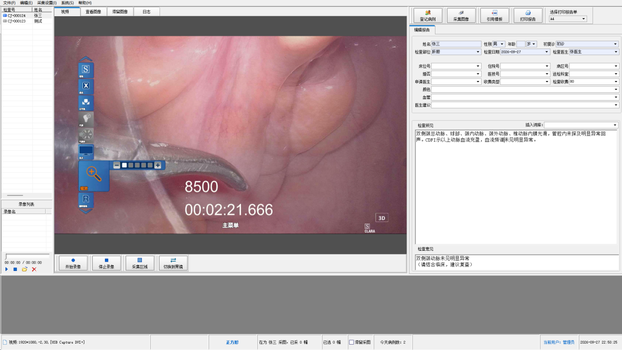
Store, view, analyze, print and edit images from medical imaging equipment, with patient record management, video capture and illustrated reporting in one workflow.
Video & image capture
Illustrated reports
Patient records
Explore features
Patient registration
Create, save and delete patient records and manage patient information.
Video & image processing
Select video sources, adjust color and clarity, record video and capture stills. Zoom, rotate, mirror and annotate images.
Reporting & administration
Edit and print reports, manage users and view categorized statistics. Includes PACS transmission and HIS integration settings, and HTML data backup.
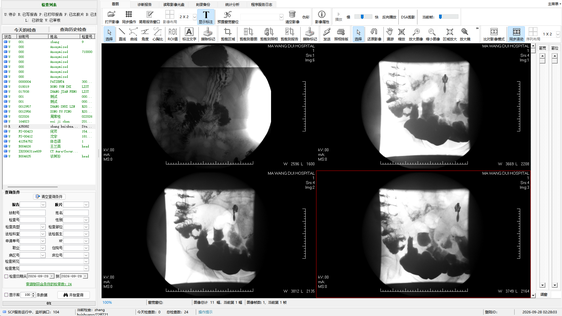
Medical image storage, communication and information management for imaging departments, from examination registration and image processing to reporting and disc backup.
Image reception & transfer
Image processing
Disc & ISO backup
Explore features
Registration & image transfer
Create, edit, save and delete examinations. Receive images from imaging equipment and send them to remote hosts.
Image processing & reporting
Adjust window width and level; zoom, pan, measure, mirror, invert, play and crop images. Arrange images for laser film printing and print illustrated reports.
Backup & administration
Burn VCD/DVD discs, create ISO files and read imaging discs. Includes user management, categorized statistics and HIS integration settings.
Main application interfaceCORE / 02
View interface ↗Medical Image Management & Transmission System Product interface
Live transmission & viewing03
Streaming Media Service Center
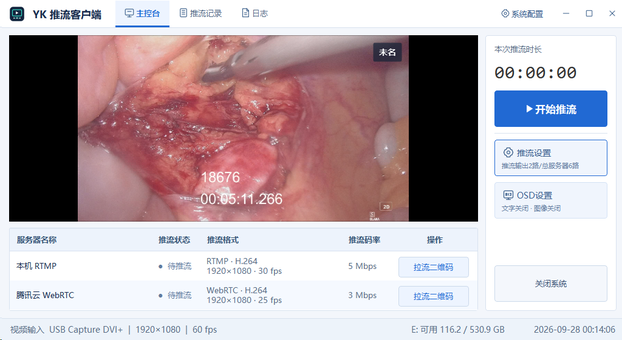
Record, compress and transmit medical imaging streams in real time, with low-latency publishing and playback over local networks and the internet.
Multi-protocol streaming
QR-code viewing
Text chat
Explore features
Protocols & encoding
Supports RTMP, HTTP-FLV, HLS, WebRTC and SRT, with H.264 and H.265 hardware and software compression.
Mobile viewing & interaction
Detects local and public IP addresses and generates QR codes for live surgical viewing on phones and tablets. Supports text chat across clients.
Server environments
Works with local and LAN streaming servers, as well as cloud media servers including Alibaba Cloud and Tencent Cloud.
Streaming client interfaceCORE / 03
View interface ↗Streaming Media Service Center Product interface
Voice control & recording04
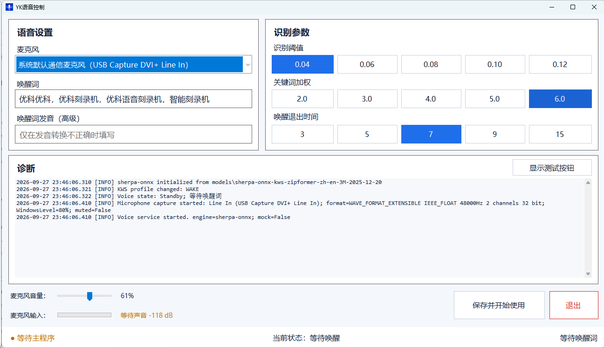
Intelligent Voice Capture System
Use voice interaction to record surgical video in real time, with live encoding, simultaneous local and USB recording, and processing for multiple 3D signal formats.
Voice interaction
Dual-destination recording
3D / 2D processing
Explore features
Live encoding & recording
Supports real-time H.264 and H.265 compression with Intel, AMD and Nvidia hardware encoding, plus H.264 and XVID software compression. Record to local and USB storage simultaneously.
Multi-format 3D processing
Convert line-by-line, side-by-side and top-and-bottom 3D signals to 2D in real time. Convert line-by-line input to lossless top-and-bottom format.
Simultaneous 3D & 2D capture
Record 3D and 2D video at the same time and save frames from 3D video as 2D images.
Quick operation manuals
Choose a model or feature guide. Scan a QR code or open a manual below. Manuals are in Chinese.
View interface ↗Intelligent Voice Capture System Product interface
Feature availability depends on the software version, supporting hardware and configuration.
Office productivity
From receipts to reimbursement forms.
Check invoices and prepare reimbursement documents locally, with records you can revisit.
Local reimbursement tool for Windows05
kr易报销
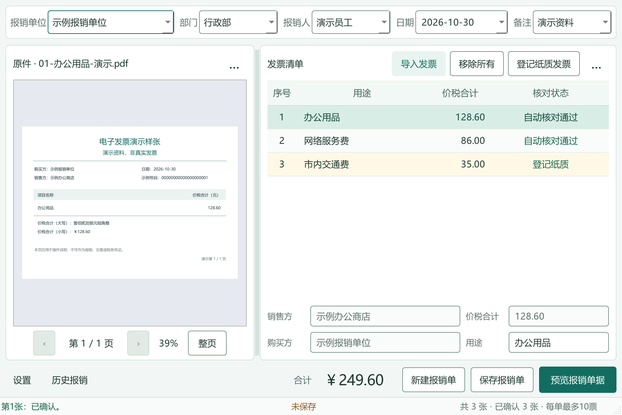
Turn receipts into an organized reimbursement form. Import Chinese electronic invoices and add paper receipt entries on your PC, check buyer details, purposes and amounts, and save reimbursement records. Combine the form and electronic originals into one PDF for previewing, exporting and printing.
Local OCR
Invoice & duplicate checks
Reimbursement PDFs
Windows 10 (1809+) / 11 · 64-bit · Up to 10 invoices per form
Explore features
Import & check invoices
Read single-page PDF and single-frame PNG or JPG/JPEG invoices using local text extraction or OCR. Check details alongside the original, detect duplicates in the current form and saved history in the same local data folder, and enter paper receipts manually.
Save & revisit records
Save reimbursement forms to local history and reload them for editing. The status bar distinguishes saved, unsaved and modified forms. Electronic originals are archived locally without changing the source files.
Create one PDF
Combine the form and electronic originals in a portrait A4 PDF for previewing, exporting or printing. Attach paper receipts as required. Exporting a PDF and saving the reimbursement form are separate actions.
Automatic checks cover consistency and duplicates; they do not verify invoice authenticity, approve claims or process payments.
Use voice interaction for recording with the Intelligent Voice Capture System. Stream live video, view on mobile devices and exchange messages with the Streaming Media Service Center.
Nanjing Core Information Technology Co., Ltd. develops software for medical imaging and audiovisual applications. Our portfolio includes the Medical Imaging Workstation, Medical Image Management & Transmission System, Streaming Media Service Center and Intelligent Voice Capture System, supporting image capture, processing, management, transmission and recording. We also offer kr易报销 for everyday invoice organization and reimbursement forms.
IMAGE CAPTURE / INFORMATION MANAGEMENT / STREAMING
Contact
Let’s talk about your software needs.
Get in touch to discuss product features, workflows and equipment configurations.
PhoneAddress
Tower A, New World Center, 88 Zhujiang Road, Xuanwu District, Nanjing, Jiangsu, China